Es
提供一种简单、高效的方式 来存储、搜索和分析大量数据
ES 支持近实时的搜索
ES 支持极大数据量
ES 提供 Resful API
主要核心就是 : 搜索
搜索引擎的搜索并不依赖 ES,因为搜索引擎优先出现 。 但是他们底层都是 倒排索引
搜索、广告、金融
数据的组织方式 :
-
索引: 类比 Mysql 的表
-
文档 : 类比 Myssql 的表的数据
数据的部署方式 :
-
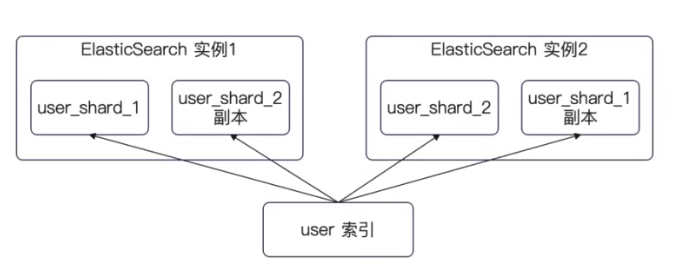
分片: 类比关系数据库的分库分表
-
副本 : 类比主从同步中的从库
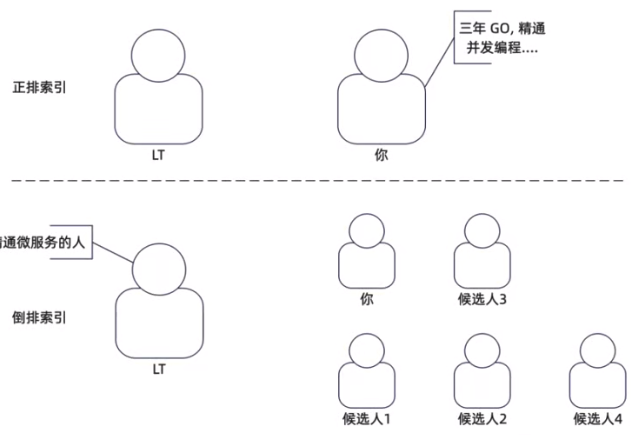
索引与倒排索引
索引 : 数据本身
倒排索引 : 从属性出发,找到这些属性的数据
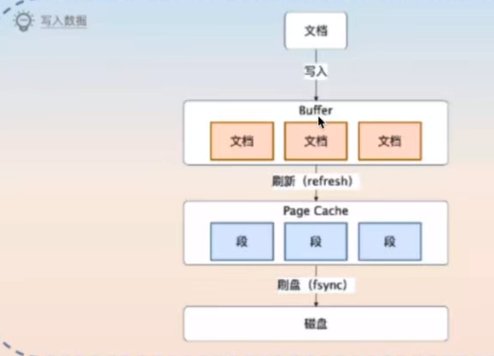
ES 写入流程 :
-
文档首先写入到 buffer 里面
-
定时刷新到 page cache 中 ,这个过程叫做 refresh
-
刷新到磁盘中
ES HTTP API
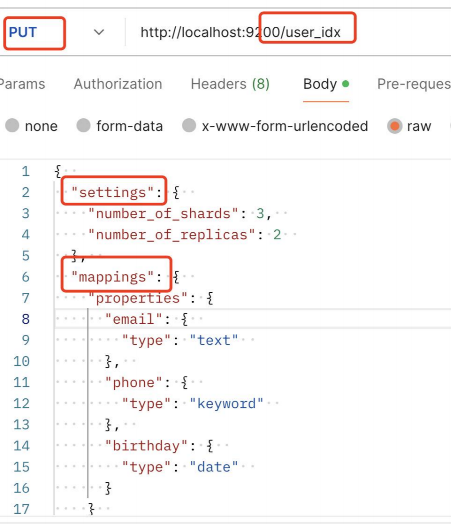
创建索引
Es 暴露了 HTTP API 。 可以通过 HTTP 请求来操作整个 CRUD
我们在下面的操作进行了 :
-
创建了一个索引
-
制定了 3个分片 和 2个副本
-
设置了3个字段,并且设置了每个字段的类型
写入数据 & 查询数据
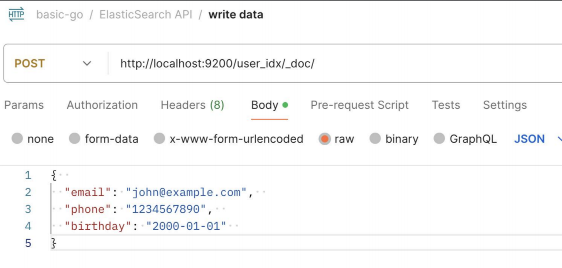
通过 指定 index 和 _doc 表示我们在 user_index 写入了数据
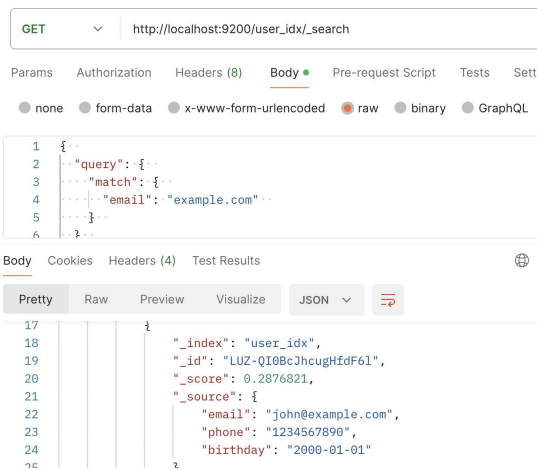
我们通过 index 和 search 指定我们查询的数据
- 虽然我们并没有指定完整的 email 但是还是返回了预期的结果
ES 支持的查询
Match Query(匹配查询):根据字段中的内容进行全文匹配查询。
• Term Query(精确查询):根据字段中的精确值进行查询,适用于 keyword 类型或者已经执行过分词器的字段。
• Range Query(范围查询):根据字段中的范围值进行查询,可以用来查询数字或日期范围。
• Bool Query(布尔查询):通过逻辑运算符(must、must_not、should)组合多个查询条件,实现更复杂的查询逻辑。
• Match Phrase Query(短语匹配查询):根据字段中连续的短语进行查询,适用于需要保持短语顺序的查询。
• Prefix Query(前缀查询):根据字段中的前缀进行查询,适用于需要按照前缀匹配查询的场景。
• Wildcard Query(通配符查询):根据通配符模式进行查询,支持通配符符号(*和?)进行模糊匹配。
• Fuzzy Query(模糊查询):根据字段中的模糊匹配进行查询,可以通过设置 fuzziness 参数来控制模糊程度。
• Nested Query(嵌套查询):根据嵌套对象进行查询,以便查询嵌套在文档中的相关信息。
• Aggregation Query(聚合查询):用于计算、统计和分析数据,包括求和、平均值、最小值、最大值、分组等
操作
查询例子
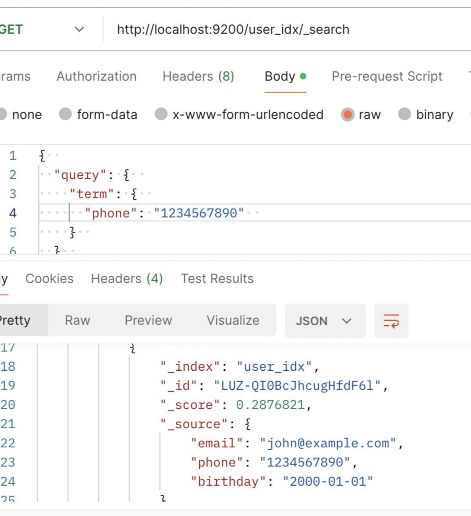
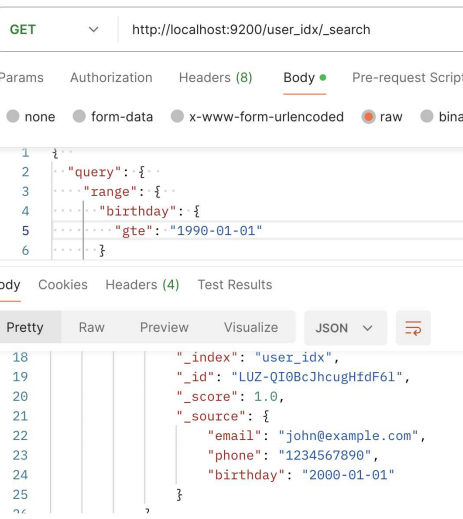
下面分别进行了
-
一次精确匹配
-
查询范围 大于等于 的日期
ES & Go
创建索引
这里可以看到,实际上我们还是需要 构造一个 如 http 一样的 jsonBody
 1
 2
 3
 4
 5
 6
 7
 8
 9
10
11
12
13
14
15
16
17
18
19
20
21
22
23
24
25
26
27
28
29
30
31
32
|
func (s *ElasticSearchTestSuite) TestCreateIndex() {
	ctx, cancel := context.WithTimeout(context.Background(), time.Second*3)
	defer cancel()
	// 这是一个链式调用,你可以通过链式调用来构造复杂请求。
	// 重复创建会报错,所以你可以换一个名字
	resp, err := s.es.Indices.Create("user_idx_test",
		s.es.Indices.Create.WithContext(ctx),
		s.es.Indices.Create.WithBody(strings.NewReader(`
{
  "settings": {
    "number_of_shards": 3,
    "number_of_replicas": 2
  },
  "mappings": {
    "properties": {
      "email": {
        "type": "text"
      },
      "phone": {
        "type": "keyword"
      },
      "birthday": {
        "type": "date"
      }
    }
  }
}
`)))
	require.NoError(s.T(), err)
	assert.NotNil(s.T(), resp)
	assert.Equal(s.T(), 200, resp.StatusCode)
}
|
写入文档
通过 client.index 指定对应的 index 然后放入文档
 1
 2
 3
 4
 5
 6
 7
 8
 9
10
11
12
13
14
|
func (s *ElasticSearchTestSuite) TestPutDoc() {
	ctx, cancel := context.WithTimeout(context.Background(), time.Second*3)
	defer cancel()
	resp, err := s.es.Index("user_idx_test", strings.NewReader(`
{
  "email": "john@example.com",
  "phone": "1234567890",
  "birthday": "2000-01-01"
}
`), s.es.Index.WithContext(ctx))
	require.NoError(s.T(), err)
	require.NotNil(s.T(), resp)
	assert.Equal(s.T(), 201, resp.StatusCode)
}
|
搜索文档
 1
 2
 3
 4
 5
 6
 7
 8
 9
10
11
12
13
14
15
16
17
18
|
func (s *ElasticSearchTestSuite) TestGetDoc() {
	ctx, cancel := context.WithTimeout(context.Background(), time.Second*3)
	defer cancel()
	resp, err := s.es.Search(s.es.Search.WithContext(ctx),
		s.es.Search.WithBody(strings.NewReader(`
{
  "query": {
    "range": {
      "birthday": {
        "gte": "1990-01-01"
      }
    }
  }
}
`)))
	require.NoError(s.T(), err)
	assert.Equal(s.T(), 200, resp.StatusCode)
}
|